Klaviyo#
The Klaviyo x Karla integration turns Karla's shipping, claim, and tracking-page events into Klaviyo metrics you can trigger flows on — and brings your Klaviyo lists and segments back into Karla for campaign targeting.
Connect#
There are two ways to connect; both end in the same secure OAuth grant — no API keys to create, copy, or manage. You need editor access or above on the Karla store.
From Klaviyo: install the Karla app#
When you install the Karla app from Klaviyo's integrations directory, you land on Karla's connect page:
- Sign in to your Karla account (or create one — you'll return to the connect page after onboarding).
- Choose the store to connect and click Connect this store.
- Approve access in the Klaviyo window that opens. It closes itself, and you land on the store's Klaviyo integration settings.
From the Karla portal: Quick connect#
1. Open the integration
In the Karla portal, go to Settings → Integrations and click Configure on the Klaviyo card.
2. Click Connect Klaviyo
In the Quick connect card, click Connect Klaviyo and approve Karla on the Klaviyo consent screen.
3. Confirm it's connected
The Connection card shows a green Connected badge and the status Connected and working.
4. Verify your metrics
In Klaviyo, open Analytics → Metrics and look for
shipment_out_for_delivery, shipment_delivered, and more.
What Karla asks for#
The consent screen requests these permissions:
| Permission | Why Karla needs it |
|---|---|
| Events (read/write) | Send shipping, claim, and tracking-page events into your account. |
| Metrics (read) | Find your metrics for flow health and revenue reporting. |
| Profiles (read/write) | Attach events to the right customer profile. |
| Lists & segments (read) | Sync your lists and segments into Karla for campaign targeting. |
| Flows & templates (read/write) | Let Karla install its ready-made post-purchase flows and templates into your account. |
| Accounts (read) | Verify the connection is healthy. |
All permissions are granted once at connect time, so you never have to re-approve as Karla ships new features.
What happens right after connecting#
Karla immediately seeds your account with its shipment metrics (about
two dozen shipment_* metrics), plus a metric per configured custom
trigger and the tracking-page retargeting metrics — so everything is
selectable in Klaviyo's flow builder from minute one, before any real event
has fired.
karla_claim_created, karla_claim_updated, and the return_shipment_*
metrics are not seeded — they appear in Klaviyo after their first real
event.
Connection status and troubleshooting#
The Connection card polls Klaviyo live:
- Connected and working — all good.
- Reconnect needed — Klaviyo access was revoked — the grant was removed on Klaviyo's side (e.g. app uninstalled there). Click Reconnect.
- "Authorization was declined." on the consent popup — you clicked Deny; retry and click Allow.
- "Klaviyo connection failed. Please retry from the portal." — the OAuth handshake failed or timed out (the connect link is valid for 5 minutes); start again from the portal.
Disconnecting#
Click Disconnect on the Klaviyo integration page. Karla revokes its own access at Klaviyo — the Karla app disappears from your Klaviyo integrations page — and you can reconnect at any time.
Klaviyo only permits OAuth connections for published apps, so connecting with a private API key is no longer available to merchants — it remains as an internal, Karla-managed fallback for a few legacy accounts and stays dormant while Quick connect is active.
Building Klaviyo Flows#
To relieve you of the work involved in setting up the Klaviyo flows, the Karla team transfers our ready-made flows including email templates into your Klaviyo account. The OAuth grant already covers the permissions this needs — no extra access to your account is required. As soon as the flows are in your account, you can customize the templates as you wish (branding, wording, etc.).
To cover the most important delivery journey events, we recommend first of all creating the flows for the following event groups:
shipment_in_transitshipment_carrier_delayshipment_damagedshipment_out_for_deliveryshipment_deliveredshipment_delivered_to_neighbourshipment_delivered_to_letterboxshipment_delivered_to_parcel_shopshipment_not_picked_up_then_returnedshipment_failed_returned
By creating these 10 flows you will be able to cover standard events
happening for every order (shipment_in_transit,
shipment_out_for_delivery), all delivered cases (shipment_delivered,
shipment_delivered_to_neighbour, shipment_delivered_to_letterbox,
shipment_delivered_to_parcel_shop) and the events that hopefully do not
happen too often, but where it is most important to be proactive with your
customers (shipment_carrier_delay, shipment_damaged,
shipment_not_picked_up_then_returned, shipment_failed_returned).
Klaviyo uses event groups (like shipment_delivered) while
webhooks use ref patterns (like
shipments/delivered/SUCCESSFULLY_DELIVERED). Event groups are
business-friendly names that group multiple specific events for easier flow
management.
For complete documentation, see: Events Reference →
Pickup Reminder Flow#
Retargeting flows#
Two optional metrics let you build flows around what shoppers do on the tracking page itself. Both are off by default — enable them on the Klaviyo integration settings page:
- Tracking Page Retargeting sends
karla_tracking_page_openedthe first time a customer opens their tracking page (once per order, within 30 days) — retarget shoppers while they wait for their delivery. - Upsell Click Retargeting sends
karla_upsell_product_clickedwhen a customer clicks a product promotion card on their tracking page. It is sent at most once per order within 7 days, so a customer browsing several products triggers your flow once. The event carriesupsell_product_id,upsell_product_title, andproduct_sourceproperties for use in your flow, plusupsell_variant_idwhen the clicked product has a variant.
Custom triggers#
In the portal under Notify → Custom Triggers you can define your own
trigger events. Each custom trigger becomes a Klaviyo metric named
karla_<trigger name>_internal_trigger, seeded the moment you create the
trigger so it's immediately available in the flow builder. Custom triggers
are currently Klaviyo-only.
Inserting the tracking page link#
To include the tracking page link in your Klaviyo emails you should use a
dynamic link with order_number and zip_code variables, so that your
customers always receive their personalised link:
For emails triggered through Klaviyo:
Karla events#
https://app.gokarla.io/track/slug?orderNumber={{ event.order_number|default:'' }}&zipCode={{ event.zip_code|default:'' }}&ref=karlahttps://yourshop.com/pages/tracking?orderNumber={{ event.order_number|default:'' }}&zipCode={{ event.zip_code|default:'' }}&ref=karlaShipping Confirmation#
Triggered by Shopify's Fulfilled_Order Event.
https://app.gokarla.io/track/slug?orderNumber={{ event.extra.order_number|default:'' }}&zipCode={{ event.extra.shipping_address.zip|default:'' }}&ref=karlahttps://yourshop.com/pages/tracking?orderNumber={{ event.order_number|default:'' }}&zipCode={{ event.zip_code|default:'' }}&ref=karlaA slug is your unique identifier that represents your shop within the
Karla system. This is used to properly route tracking information and ensure
that shipment data is associated with the correct merchant account.
Testing the flows#
Once you've set up the flows and the respective emails it is important you make sure that the integration is working as expected.
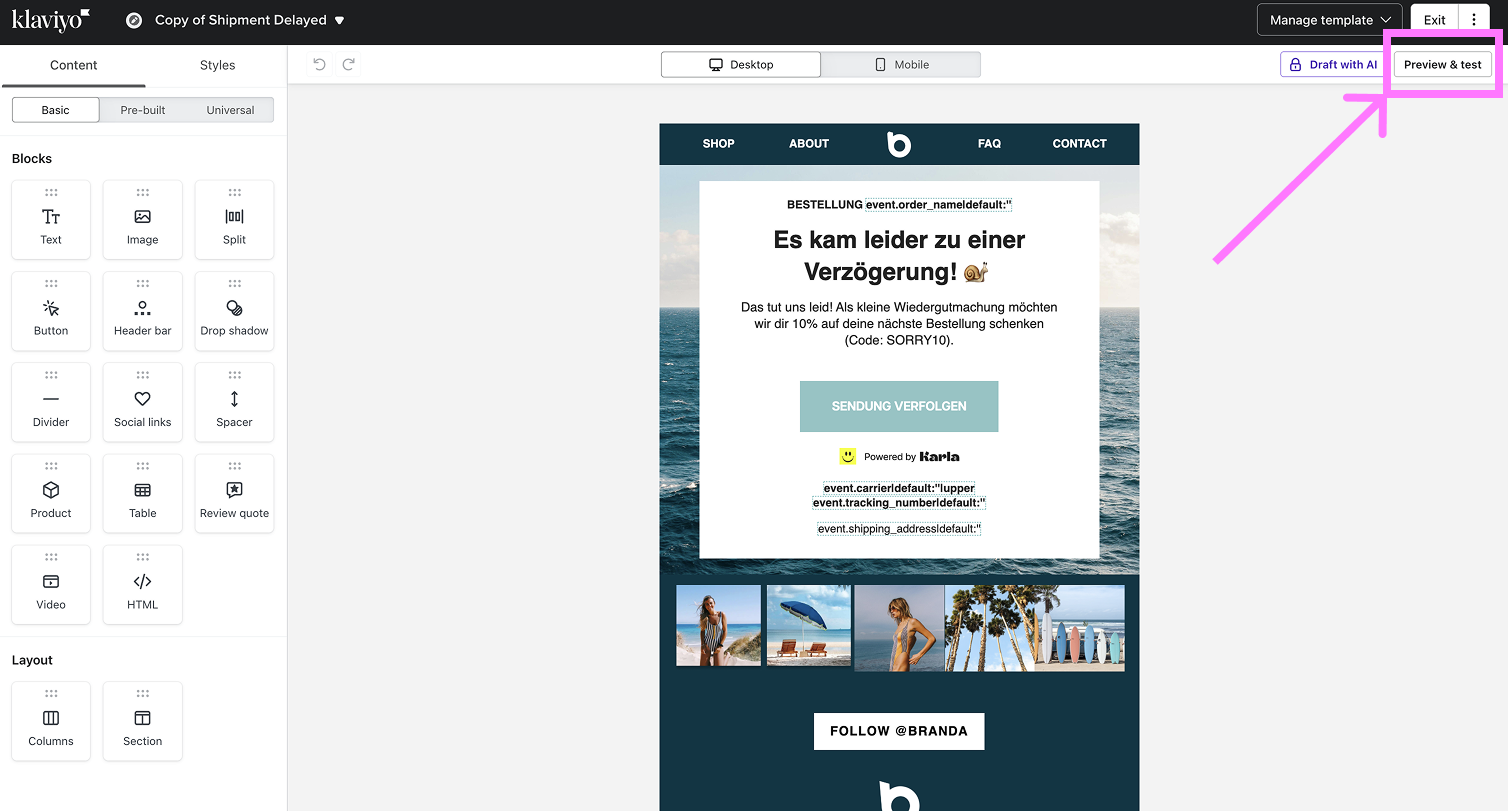
In the Email Template Editor go to Preview & Test
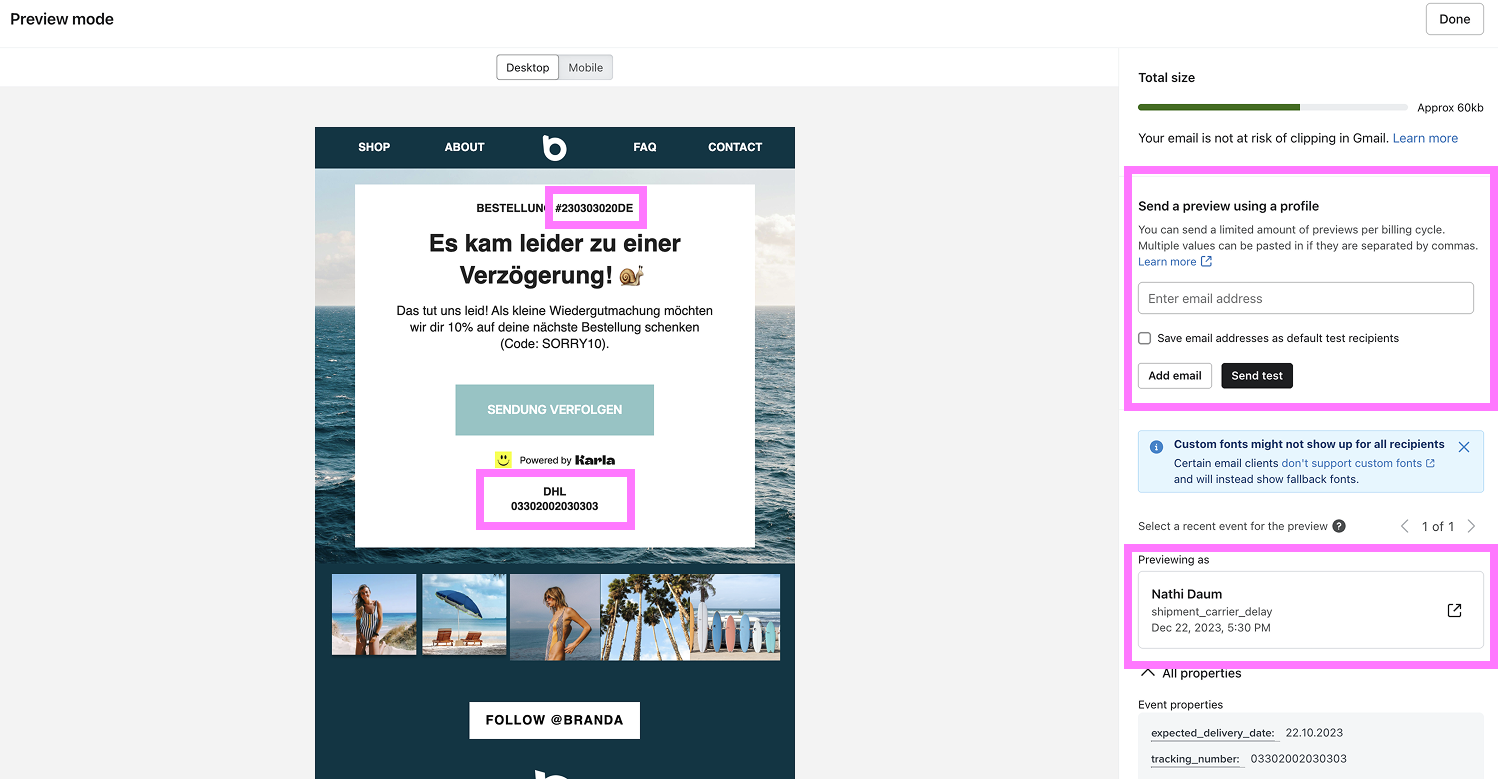
There make sure that in the profiles you see the information from the profiles from your shop and not from Karla's test events. These should be infos like customer name, order number, shipping address etc.
You will see this information only after you have integrated your Shopify/Shopware Shop and Klaviyo with Karla. More on shop integrations
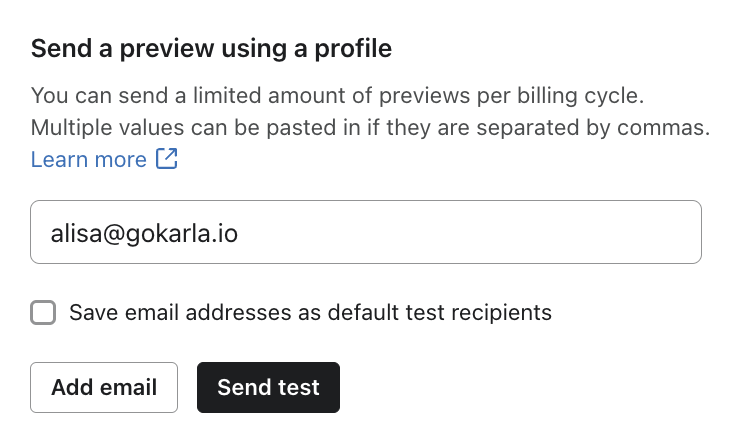
If you want to see how your customers will receive the emails, you can send a test email to your email-address.
Putting the flows live#
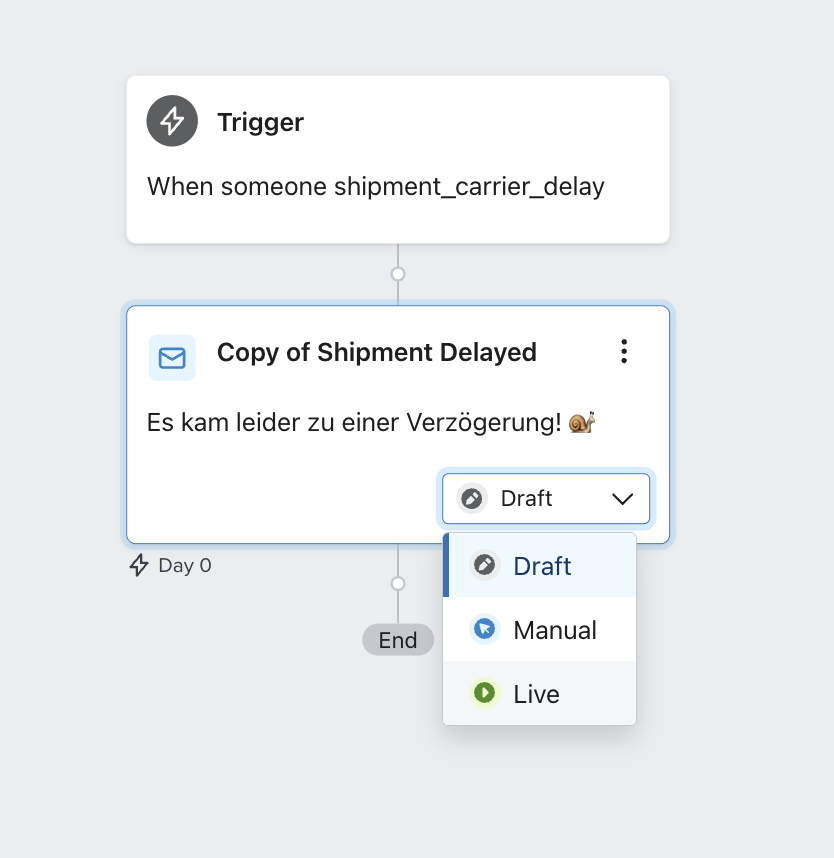
After you have tested your flows, you can put them live upon the agreed go-live date.
Make sure you have requested the transactional status for your Karla flows and have disabled the Smart Sending feature, so that all of your customers receive their shipping updates.
Metric reference#
Karla sends the following metrics to your Klaviyo account. Shipment metrics
use the event-group name verbatim; claim, tracking-page, and custom-trigger
metrics carry a karla_ prefix.
Shipment metrics#
| Metric | Description |
|---|---|
shipment_order_placed | Order placed (draft shipment created) |
shipment_pre_transit | Package prepared for shipping |
shipment_in_transit | Package moving through network |
shipment_carrier_delay | Carrier-reported delays |
shipment_damaged | Package damage reported |
shipment_out_for_delivery | Package out for delivery |
shipment_delivered | Successful delivery |
shipment_delivered_all_events | Fires alongside every delivered variant (see settings) |
shipment_delivered_to_letterbox | Delivered to letterbox |
shipment_delivered_to_neighbour | Delivered to neighbor |
shipment_delivered_to_parcel_locker | Delivered to parcel locker |
shipment_delivered_to_parcel_shop | Delivered to pickup point |
shipment_delivery_failed | Delivery attempt failed |
shipment_delivery_failed_address_issue | Address problems |
shipment_delivery_failed_forwarded_to_parcel_shop | Forwarded to pickup |
shipment_delivery_second_attempt | Reattempting delivery |
shipment_delayed_due_to_customer_request | Delivery delayed at the customer's request |
shipment_picked_up | Successfully picked up |
shipment_not_picked_up_then_returned | Not picked up, returned |
shipment_refused_then_returned | Customer refused package |
shipment_failed_returned | Package returned to sender |
shipment_carrier_changed | Shipment handed to a different carrier |
shipment_order_cancelled | Order cancelled |
shipment_eta_updated | Estimated delivery date changed |
Return shipment metrics#
When a customer sends a package back, the return leg fires its own metrics:
return_shipment_in_transit, return_shipment_out_for_delivery,
return_shipment_carrier_delay, return_shipment_delivery_failed, and
return_shipment_delivered.
Karla-prefixed metrics#
| Metric | Fired when |
|---|---|
karla_claim_created | A customer submits a claim via Resolve |
karla_claim_updated | A claim's status changes |
karla_tracking_page_opened | Tracking page opened (retargeting) |
karla_upsell_product_clicked | Upsell product clicked (retargeting) |
karla_<trigger>_internal_trigger | A custom trigger fires |
karla_referral_friend_ordered | A friend ordered with the customer's referral code (referral events) |
karla_referral_reward_earned | The customer's referral reward code was issued or raised |
karla_referral_code_expiring | The customer's referral code expires within the next 7 days |
Every referral event also sets these properties on the advocate's profile, so
you can build segments of your advocates: karla_referrals_count,
karla_last_referral_at, karla_referral_code, karla_referral_reward_code,
karla_referral_reward_value and karla_referral_reward_expires_at. A
property without a value (no live referral code, no open reward code) is
removed from the profile. Karla also refreshes them, without an event, when a
reward code is used or a referral is voided.
Integration settings#
On the Klaviyo integration page in the portal:
| Setting | Default | What it does |
|---|---|---|
| Klaviyo Notifications | off | Master switch — send tracking event notifications to Klaviyo. |
| Delivered Events Trigger | on | Additionally fire shipment_delivered_all_events alongside every delivered variant, so one flow can cover all delivery outcomes. Late deliveries still fire it up to 48 hours after the event. |
| Klaviyo Segments | on | Sync your Klaviyo lists and active segments into Karla as Klaviyo.list.<name> / Klaviyo.segment.<name> segments for campaign targeting. |
| Tracking Page Retargeting | off | Send karla_tracking_page_opened (details). |
| Upsell Click Retargeting | off | Send karla_upsell_product_clicked (details). |
| Referral Events | off | Send karla_referral_friend_ordered, karla_referral_reward_earned and karla_referral_code_expiring to the advocate's profile, and keep their referral profile properties up to date. |
For how synced segments drive campaign targeting, see Campaigns.
Need help?#
Questions about connecting Karla and Klaviyo? Email us at [email protected] and we'll help you get your first flow live.
Related articles#
- WhatsApp — forward these same Klaviyo triggers to WhatsApp.